
What Is an AI Skill?

Most people still think AI is just a smarter chatbot. You type something, it replies. End of story. But the moment you give an AI actual skills, everything changes. Suddenly it stops talking and starts doing. I’ve watched this shift happen in real products we build at aidrift.tech. The teams that treat AI like a colleague with specific abilities get 5–10× more done than the ones who only prompt. Here’s what AI skills actually are, why they matter right now, and the exact examples you can copy today.
What Is an AI Skill?
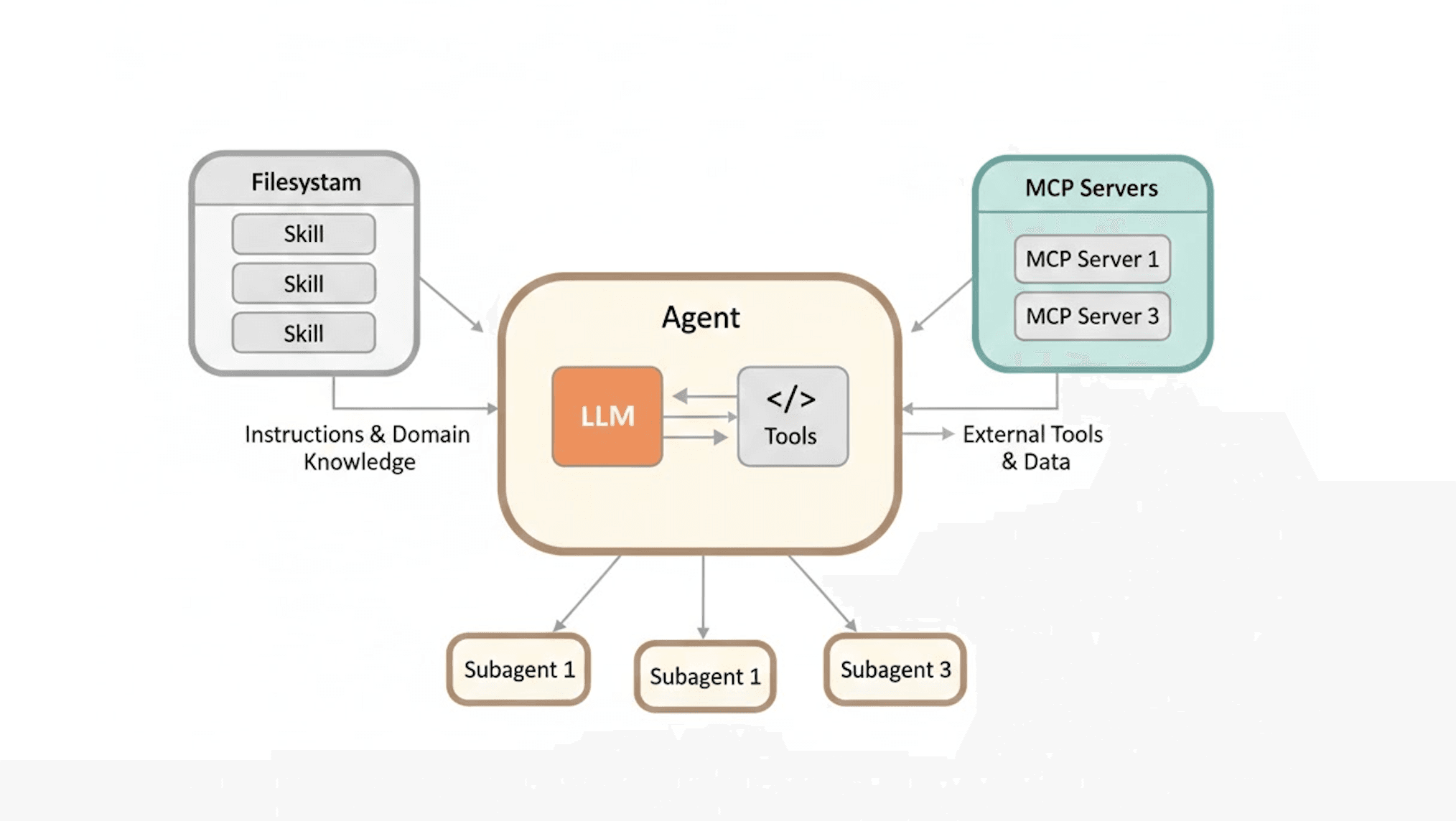
Think of a skill as a Lego brick the AI can snap onto itself.
It’s a self-contained capability that lets the model interact with the outside world or perform a precise action instead of just generating text.
A basic LLM is like a brilliant intern who can only write emails and brainstorm. Give it skills and it becomes the intern who can also:
open your CRM
run code
book a calendar slot
scrape a competitor’s pricing page
In technical terms, a skill is usually a tool call, a function, or a mini-program that the AI decides when and how to use. Modern agent frameworks (LangGraph, CrewAI, AutoGen, and the ones we ship at aidrift.tech) let the model plan, pick the right skill, execute it, and loop back with results.
Why Skills Are Suddenly Essential
Raw GPT-4o or Claude 3.5 is incredibly smart but completely blind and paralyzed. It can’t check your Google Sheet, send a real Slack message, or know what happened five minutes ago.
Skills fix three big problems at once:
Action gap — The AI moves from suggestion to execution.
Fresh data — It pulls live information instead of hallucinating old knowledge.
Specialization — One agent can have 8–10 narrow expert skills instead of being a mediocre generalist.
Founders who ignore this are still copy-pasting outputs manually. Teams using skills are shipping entire automated departments.
Real Examples You Can Use Tomorrow
Here are four skills I actually run in production workflows right now.
1. Competitive Intelligence Skill
An agent monitors 12 competitor landing pages every morning.
Skill stack: Playwright browser tool + structured extraction + Notion write.
Result: Daily 3-bullet summary of pricing changes, new features, and copy tweaks lands in my team channel before I finish coffee. No more manual checks.
2. Personal CRM Update Skill
After every sales call (Zoom + Fireflies transcript), the agent:
extracts key points and objections
updates the deal stage in HubSpot
drafts a follow-up email
books the next call if the sentiment score is high enough One skill replaced two full-time VA hours per week.
3. Code Review + Auto-Fix Skill
Our engineering agent gets a GitHub PR link.
Skills used: GitHub API + code execution sandbox + linting tools.
It comments on architecture issues, runs tests in the background, and even opens a new branch with fixes if they’re trivial. The team still approves, but the first pass is 80 % cleaner.
4. Content Repurposing Skill (my personal favorite)
You drop a long YouTube video or podcast transcript.
The agent uses:
Whisper-style transcription check
summarization skill
image generation skill (for thumbnails)
SEO research skill
LinkedIn/Twitter/X formatting skill One 45-minute podcast becomes 7 LinkedIn carousels, 3 Twitter threads, 1 blog post, and 5 email snippets in under 12 minutes.
These aren’t sci-fi. They’re all running today on aidrift.tech workflows and open frameworks.
How to Start Adding Skills Without Becoming a Developer
You don’t need to code everything. The fastest path right now:
Start with no-code agent builders (aidrift.tech, n8n AI nodes, Make.com AI actions)
Use pre-built skill libraries (OpenAI function calling, Anthropic tools, LangChain toolkits)
Test one skill at a time — solve a single painful 30-minute weekly task first
The magic happens when you chain 3–4 skills into a full workflow. That’s when the AI stops feeling like a tool and starts feeling like a teammate who never sleeps.
The Bottom Line
Skills are what turn impressive demos into actual leverage.
If your AI can only chat, you’re leaving 90 % of the value on the table. Give it the right skills and it becomes the most productive member of your team — one that scales infinitely and costs pennies.
The teams figuring this out in 2026 aren’t just using AI.
They’re building with it.
Inline image ideas
Agent skill map Prompt: Top-down flatlay of a futuristic mind-map on a dark desk: central glowing “AI Agent” node connected by glowing lines to six skill icons (browser window, Python code snippet, email envelope, calendar, spreadsheet, CRM dashboard). Clean minimal tech illustration style, neon blue and purple palette, premium editorial feel.
Before vs after workflow Prompt: Split-screen comparison image: left side chaotic desk with sticky notes and manual screenshots labeled “Old way”; right side clean laptop screen showing automated AI workflow with connected skill blocks and green checkmarks. Modern startup aesthetic, realistic lighting.
Founder using skills dashboard Prompt: Close-up of a founder’s hands typing on a MacBook with the screen showing an AI agent dashboard. Visible skill cards lighting up one by one as the agent works. Soft natural window light, shallow depth of field, authentic workspace vibe.
FAQ
What’s the difference between a tool and a skill?
Tools are the raw building blocks (API calls, code runners). Skills are the higher-level, reusable packages that combine tools with logic and memory so the agent knows when to use them.
Do I need coding skills to create AI skills?
Not anymore. Most platforms now let you describe the skill in plain English and connect it via no-code interfaces. You only dive into code when you need something extremely custom.
Can one agent have too many skills?
Yes. Past 8–10 skills the agent starts getting confused and makes poorer decisions. The winning pattern is narrow agents with 3–5 deep skills each, orchestrated by a supervisor agent.
Are skills platform-specific?
Some are (like native aidrift.tech skills), but the concept is universal. You can export most skills and reuse them across LangGraph, CrewAI, or even custom GPTs with actions.